

SVS Fantasy Oasis Trade Truck is a cargo transport feature that lets players deliver supplies for rewards. You can refresh cargo in search of higher quality and plunder other players’ trucks. Your own truck can also be intercepted during transport, resulting in the loss of some of its resources.
SVS Fantasy Oasis Trade Truck: What Should You Check Before Departure?
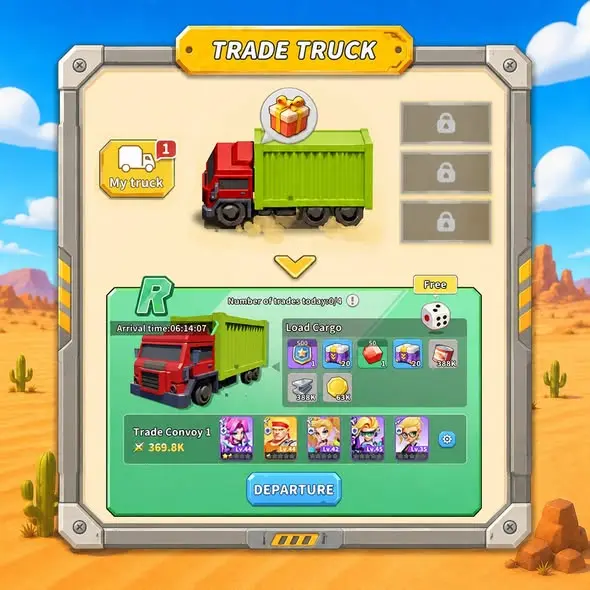
In the supplied Trade Truck image, My truck identifies your own truck area. Cargo, convoy details, and the DEPARTURE button appear below. Before departure, distinguish the cargo rewards from the convoy setup, then review the refresh option.
| On-screen Label | Purpose or Displayed Information | What Beginners Should Check |
|---|---|---|
| My truck | Your own truck area | Confirm that you are viewing your own truck |
| Load Cargo | Cargo icons and quantities | Review the items and resources shown for this shipment |
| Trade Convoy 1 | Convoy characters and combat power | Check the displayed convoy setup |
| Dice icon and Free label | Refresh-related area | Check whether the current action is free and read its prompts |
| DEPARTURE | Departure button | Confirm cargo and convoy details before leaving |
The example truck has an R label, with several items and resources listed under Load Cargo. These are the contents shown in that image; they do not mean every Trade Truck shipment provides the same items or quantities.
SVS Fantasy Oasis Cargo Refresh: How Does It Work Before Departure?
The feature description confirms that refreshing lets you seek higher-quality cargo. The supplied departure screen shows a dice icon near Load Cargo, with Free displayed above it.
Free is the label shown in this image; it does not establish that every refresh is free. The available information does not specify daily free attempts, subsequent costs, reset times, or whether a refresh guarantees better quality. Check the prompts shown for your own account before proceeding.
Editor’s tip: Review your current cargo first, then check the cost and rules for the refresh. After refreshing, inspect the cargo list again instead of continuing to spend resources simply because the option is available.
How Do You Read Trade Convoy and the Departure Button?
The SVS Fantasy Oasis Trade Convoy panel, labeled Trade Convoy 1 in the departure image, shows character portraits, a combat power value, and a settings icon. These identify the example convoy setup, but the image does not explain the full relationship between convoy power and plunder outcomes.
Editor’s tip: Check your current cargo, refresh costs, and convoy setup before using DEPARTURE. Do not treat the example account’s combat power as a departure requirement or assume higher power makes a truck immune to plunder.
Start Your Trade Truck Shipment
Download SVS Fantasy Oasis to review your cargo and convoy setup, deliver supplies, and experience truck plunder.

SVS Fantasy Oasis Truck Plunder: How Do You View Other Players’ Trucks?
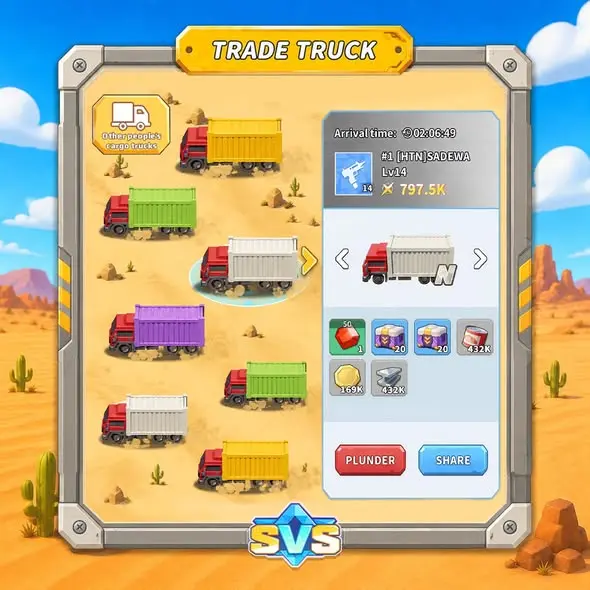
The other supplied image has the label “Other people’s cargo trucks” in the upper-left corner, identifying the screen for other players’ trucks. The selected truck’s panel on the right shows player information, combat power, Arrival time, cargo, and the PLUNDER and SHARE buttons.
| On-screen Label | Confirmed Information |
|---|---|
| Other people’s cargo trucks | The screen for other players’ trucks |
| Arrival time | A field related to arrival timing |
| Player information and combat power | Details associated with the selected truck |
| Cargo icons | Items and resources displayed for the selected truck |
| PLUNDER | Entry point for plundering |
| SHARE | Entry point for sharing; recipients and subsequent steps are not shown |
The feature description confirms that plundering other players’ trucks can provide rewards. However, the available information does not specify attempt limits, success conditions, the proportion you can take, or whether all displayed cargo can be stolen. The cargo list should therefore not be treated as a guaranteed reward from a single plunder attempt.
What Should Beginners Consider Before Transporting or Plundering?
Your own truck can become a target for other players. Account for possible interception during transport instead of treating all cargo shown before departure as guaranteed earnings.
Editor’s tip: When starting with Trade Truck, first get familiar with checking the information for a single departure. When viewing other players’ trucks, review the target’s details and cargo before deciding whether to use PLUNDER. Do not judge rewards or battle outcomes solely by truck color or a single combat power value.
To learn about technology research related to troop strength, continue to the Research Center Guide. The Research Center is a separate development system; the available information does not establish whether it directly increases truck rewards or reduces losses from plunder.
Play SVS Fantasy Oasis
Download SVS Fantasy Oasis to experience Trade Truck cargo transport, refreshes, and plunder, and explore other resource-gathering and development features.

Explore More SVS Guides
Read the Map Search Guide to learn about finding other map targets, including resource sites, Gulu Bases, and Elite Monsters.