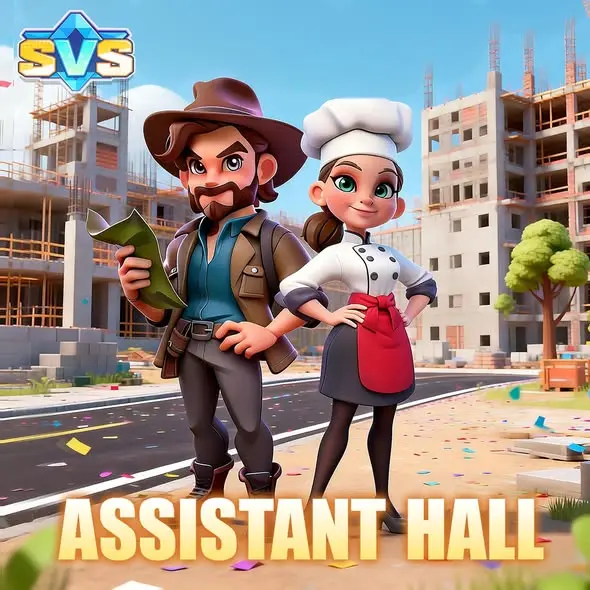


The Assistant System in SVS Fantasy Oasis provides resource production, development, and military buffs through assistants.
Different assistants provide different effects, and assigning them to buildings can activate corresponding bonuses. New players can start by checking the Overview screen, then review building assignments and Star Promotion before deciding which assistants to develop.
What Buffs Can Assistants Provide?
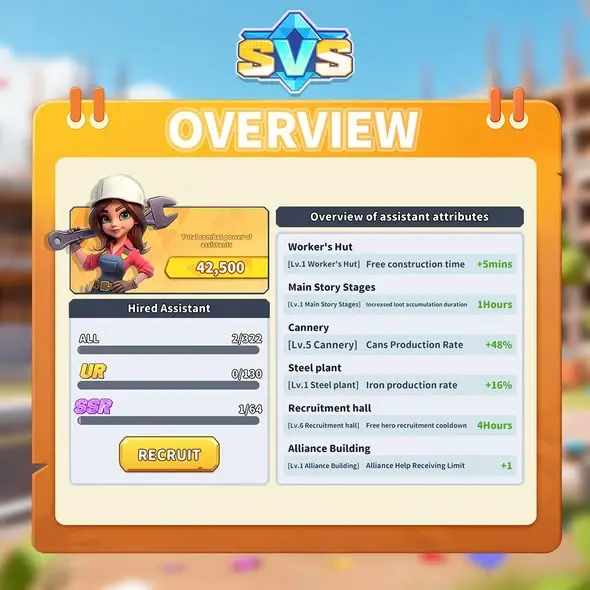
Assistants contribute to combat power as well as building-related production and development. The Overview screen lists assistant buffs under “Overview of assistant attributes,” where you can review the current effects.
The table below includes examples visible in the supplied Overview image. These values reflect the state shown in that image. They are not starting bonuses for every player or a complete list of all assistant effects.
| Building | Effect Shown | Example Value |
|---|---|---|
| Worker’s Hut | Free construction time | +5 minutes |
| Cannery | Cans Production Rate | +48% |
| Steel plant | Iron production rate | +16% |
| Alliance Building | Alliance Help Receiving Limit | +1 |
Alliance Help can shorten building, research, and healing timers. See our Alliance Help Guide for details. The assistant bonus shown above affects how many help actions you can receive; it does not describe the time removed by each action.
Read the 👉【Alliance Help Guide 】to learn how alliance help applies…
Where Can You View Assistant Recruitment and Building Assignments?
The RECRUIT Button in Overview
The Hired Assistant section on the left side of Overview displays hired assistant counts and rarity labels such as UR and SSR. The RECRUIT button below identifies the recruitment entry point.
The supplied image does not show the recruitment page, so it does not establish recruitment costs, drop rates, or guarantee conditions. Read the rules on the in-game recruitment page before recruiting.
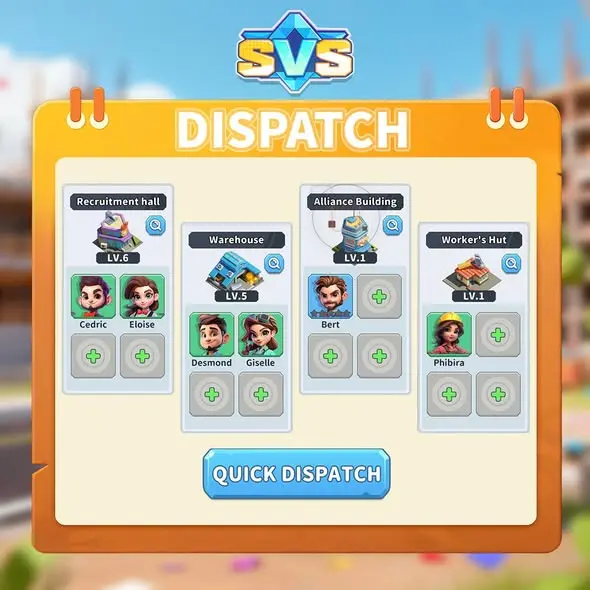
Buildings and Assistant Slots in Dispatch
Bert is shown in Alliance Building and Phibira is shown in Worker’s Hut in the example screen. These are example assignments and do not prove that they are required or optimal combinations.
For example, Bert is assigned to Alliance Building and Phibira to Worker’s Hut in the image. These are example assignments; the image alone does not establish them as required or optimal combinations.
A QUICK DISPATCH button appears at the bottom of the Dispatch screen.
The screen confirms that this option exists, but the available material does not explain how Assistants are selected or whether Quick Dispatch always matches every player’s development priorities.
Try the Assistant System in SVS Fantasy Oasis
Download SVS Fantasy Oasis to explore Assistant building buffs, assignments, and Star Promotion as you develop your Oasis.


Buildings and Assistant Slots in Dispatch
The Dispatch screen groups Assistant assignments by building.
The supplied example includes Recruitment Hall, Warehouse, Alliance Building, and Worker’s Hut. Each building column can show assigned Assistants and empty slots marked with a plus sign.
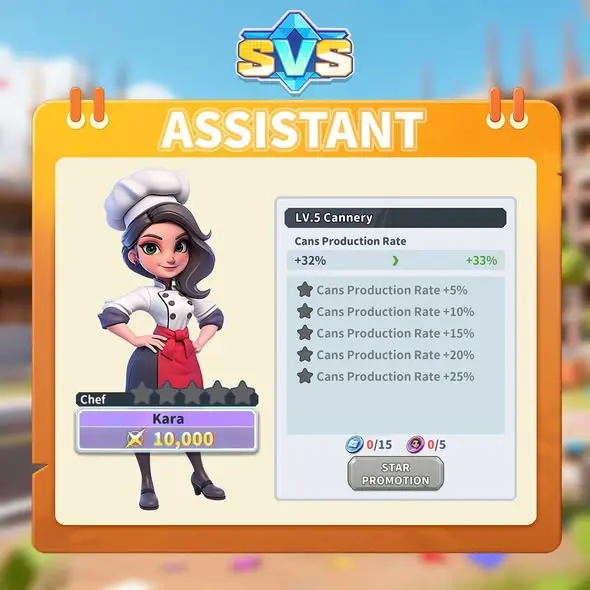
| Detail | What the Kara Example Shows |
|---|---|
| Assistant name | Kara |
| Role label | Chef |
| Effect panel heading | Lv.5 Cannery |
| Bonus preview | Cans Production Rate: +32% → +33% |
| Upgrade option | STAR PROMOTION |
This image illustrates how the star promotion page previews an effect, but it does not establish that every star promotion adds exactly one percentage point. The “Lv.5 Cannery” label should not be interpreted as Kara’s level or the level required to unlock the Assistant System.
Two requirement icons and their quantities appear above STAR PROMOTION, but the image does not name the items. Before upgrading, confirm the required items and the amounts you own in the game rather than identifying materials from icons alone.
Which Assistants Should Beginners Upgrade First?
The feature description states that higher-rarity assistants provide stronger bonuses. However, the available information does not include a complete assistant roster or comparisons under equivalent conditions, so it does not support a universal upgrade ranking.
Editor’s tip: Start with the area you currently want to improve, then compare assistant effects, rarity, and upgrade requirements. If your priority is can production, look at assistants associated with Cannery. If you are focusing on construction or alliance help, check the bonuses for the corresponding buildings.
Before investing in an assistant, check its specific effects and building assignment, then review the star promotion preview. Higher rarity or an appearance in the example account does not automatically make an assistant your most useful upgrade right now.
How Does the Assistant System Differ from the Research Center?
The Assistant System provides buffs through assistants and building assignments. The Research Center uses technology research to support resource production, troop strength, and development efficiency. Read the Research Center Guide to learn more about technology research and plan your progress across these systems around your current goals.
Play SVS Fantasy Oasis
Download SVS Fantasy Oasis to explore assistant assignments, building buffs, and technology research as you plan your development.

Explore More SVS Guides
For another development system, read the Research Center Guide to learn how technology research supports resource production, troop strength, and development efficiency.