

Use Map Search in SVS Fantasy Oasis to quickly find Gulu targets, resource sites, and Elite Monsters. This guide explains what each search option shows and what to check before searching.
Looking for the same target by dragging around the map gets old pretty quickly.
Map Search puts several common targets in one screen, so you can pick what you need and search for it directly.
From the current interface, the main options shown are Normal Gulu targets, resource sites, and Elite Monsters.
Normal Gulu
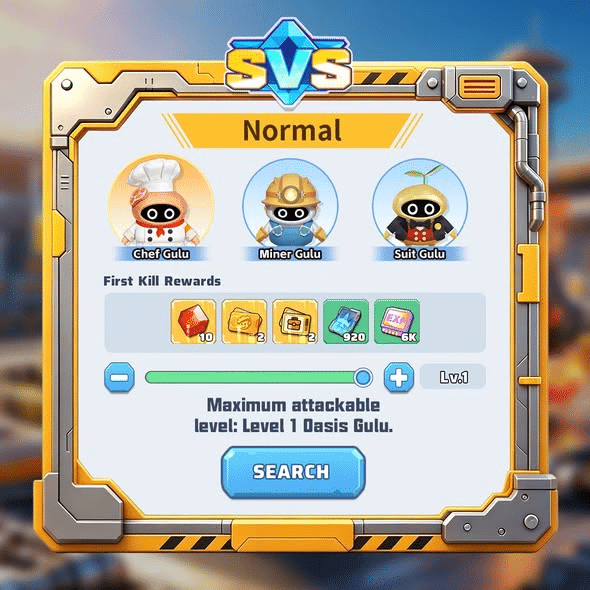
Open the Normal tab and you will see three Gulu targets: Chef Gulu, Miner Gulu, and Suit Gulu.
There is more information on this screen than just the target names. First Kill Rewards are shown underneath, and the slider at the bottom lets you change the target level before searching.
The interface also tells you the maximum Gulu level currently available to attack.
If you are specifically looking for one of these Gulu targets, there is no real reason to search the map by hand first. Pick the target, check the level, and use Search.
Normal Gulu
Open the Normal tab and you will see three Gulu targets: Chef Gulu, Miner Gulu, and Suit Gulu.
There is more information on this screen than just the target names. First Kill Rewards are shown underneath, and the slider at the bottom lets you change the target level before searching.
The interface also tells you the maximum Gulu level currently available to attack.
If you are specifically looking for one of these Gulu targets, there is no real reason to search the map by hand first. Pick the target, check the level, and use Search.
Collecting Resources
For materials, switch over to Collect.
The current screen lists Cannery, Steel Plant, and Gold Mine as searchable locations.
The middle of the panel shows Possible Gains, while the level control sits underneath it.
That makes this tab useful when you already know what kind of resource location you want. For example, if you are looking for a Gold Mine, you can select it directly instead of checking random resource points around the map.
Elite Monsters
The third useful section is Elite Monsters.
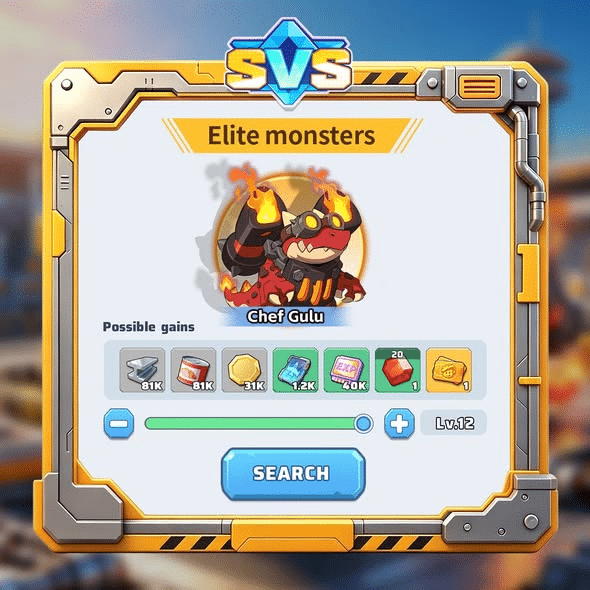
In the screenshot provided for this guide, the selected target is Chief Gulu. The screen shows its Possible Gains, along with a level slider. The example target is set to Lv.12.
That Lv.12 value is only what appears in the example screenshot. Your own available level may be different, so check the number shown in your game before starting the search.
How I Would Use the Map Search Screen
The easiest way to use this screen is to start with the thing you actually need.
Looking for Chef Gulu, Miner Gulu, or Suit Gulu? Use Normal.
Need a Cannery, Steel Plant, or Gold Mine? Go to Collect.
Want to find Chief Gulu or another target shown under stronger monsters? Check Elite Monsters.
After choosing the target, look at the level selector and the reward information on the same screen. If everything matches what you want, press Search.
A Few Details Worth Checking
The level selector matters. Do not assume the level shown in a screenshot will be the same on your account.
The reward panel is also worth a quick look. Normal targets may show First Kill Rewards, while other search screens can display Possible Gains.
And if an old screenshot does not match your current game, trust the live interface. Targets, levels, and reward displays can differ as your account progresses.
That is really all you need for Map Search. It is a small system, but once you know where Normal, Collect, and Elite Monsters are, finding a specific target becomes much more direct.